
目次
In a rush? Download the PDF for later
Download the ハウツーガイド最初の90日間
Pendo’s interactive benchmarks study highlighted product engagement trends across over 1,000 products. One engagement metric, app retention, measures how many users continue using an application during a given period of time. In the case of our study, app retention reflects the percentage of users retained in the first three months of usage.
早期のプロダクトエンゲージメントは、ユーザーの長期的な健全性を示す重要な指標です。そのため、ユーザーがプロダクトの価値をできるだけ早期に見つけられるよう支援することが不可欠です。Pendoの調査によると、最初の90日間に定期的に利用しているユーザーはわずか30%で、初期のユーザー体験の重要性が明らかになってきました。
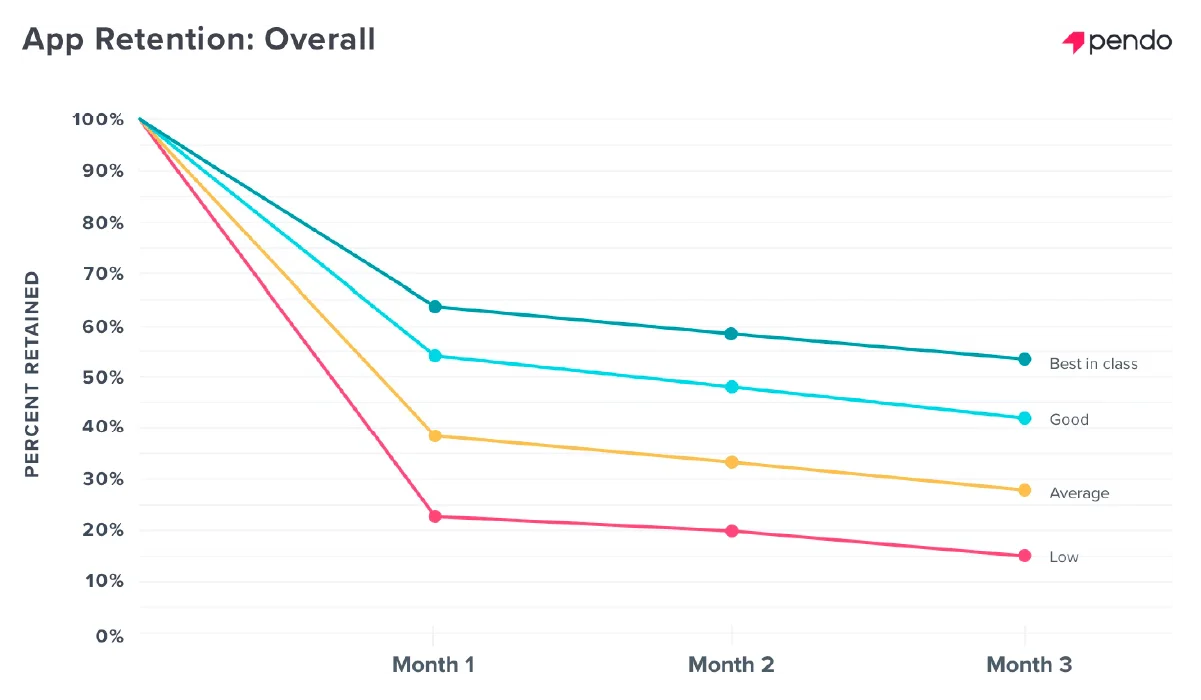
このような使用率の落ち込みが発生するため、プロダクトチームやカスタマーサクセスチームは、その原因は何か、またさらに重要なこととして、これに対して何ができるかを考える必要があります。
価値のギャップ
最初の90日間でエンゲージメントが低下する原因は「価値のギャップ」であり、実際の提供価値が想定したものと一致しないことが原因です。多くの場合、ユーザーの能力不足やプロダクトの欠陥ではなく、教育が不足しているためにユーザーがアプリの価値を見出せないことが問題です。
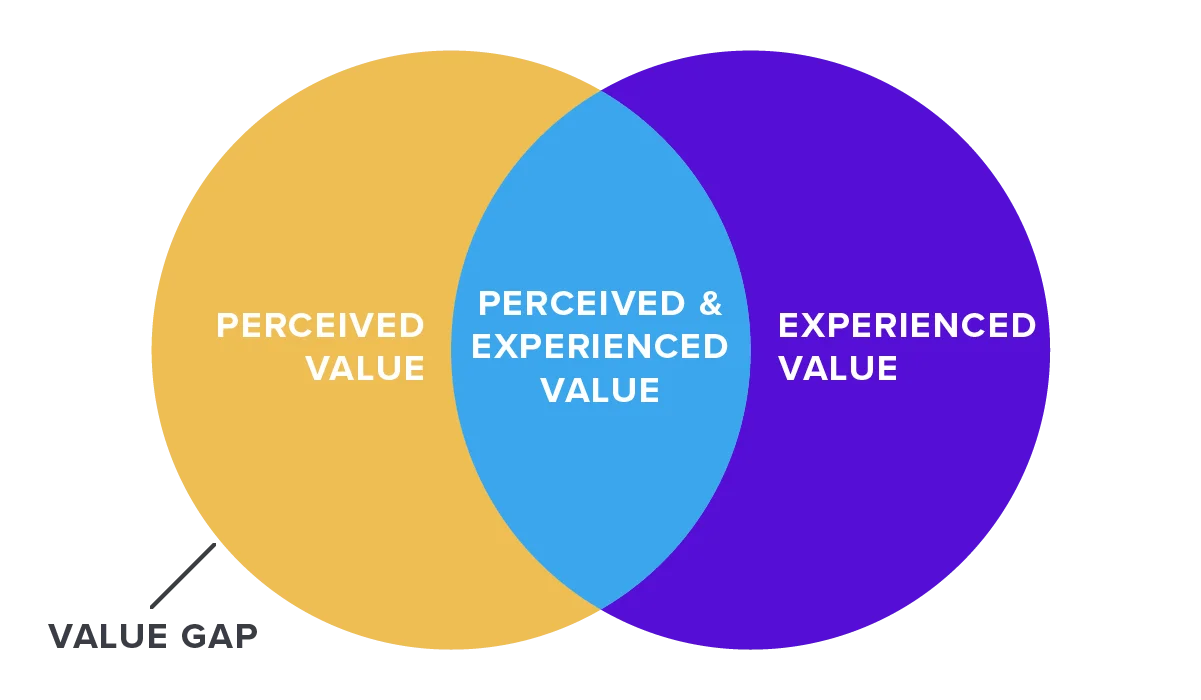
Bridging the value gap relies on an effective onboarding experience that guides users to the value they anticipate in the time they expect. Historically, product onboarding has been achieved three different ways:
1. Self-discovery: This approach lets the customer explore and discover the product on their own without guidance. While this may work for certain users, this approach increases the risk that users may not find that “a-ha” moment or achieve that first quick win.
2. Human assisted: This method relies on in-person product training sessions, email drip campaigns, or external help documentation to guide users through the product. While this approach provides detailed support, these methods may be more time-intensive or require significant technical overhead. It’s also important to do these sessions close to when a user is actually accessing the product to ensure the training feels relevant and information is retained.
3. Automated in-app: Quickly becoming an industry best practice, this strategy provides in-app onboarding walkthroughs and tutorials. In-app guidance provides just-in-time support, can be customized, and helps accelerate time to value for the customer. It, however, shifts some of the overhead and time requirements to the team building the product.
アプリ内オンボーディング体験を構築するには、綿密な計画を立て、反復と実験を繰り返さなければなりません。ですが、効果的に行い、ユーザーオンボーディングをプロダクトに組み込むことで、ユーザー満足度、リテンション、ビジネス成長を促進する最大級の要因とすることができます。
Pendoのコードフリーなアプリ内オンボーディングを活用することで、開発チームの貴重な時間を犠牲にすることなく、プロダクト内オンボーディングのメリットを享受できます。本機能を活用し価値を見出せているお客様を調査しました。ぜひご参考ください。
「なぜ」と「誰」から始まります
オンボーディングウォークスルーを構築する前に、オンボーディングの構造やコンテンツを決めるうえで明確にする必要がある質問に回答します。まず、オンボーディングフローで達成しようとする目標を明確にします。
目標の例としては、以下のようなものがあります:
- 主要フィーチャー(機能)の認知度と定着化の改善
- フリーミアムや無料トライアル体験からのコンバージョンの増加
- 社内ツールの定着化
オンボーディングウォークスルーでどの機能を強調するか、また、情報をパッシブに表示するかアクティブに表示するかは、目標に応じて決まります。
次に、メッセージを受け取るユーザーのグループを評価します。以下の質問について検討してください:
- プロダクトを使用するユーザーの目標は何ですか?それをもとにオンボーディングウォークスルーでどの機能を強調表示するかを指定します。
- ユーザーの技術的習熟度はどの程度ですか?習熟度をもとにコンテンツで提供する詳細レベルを決定します。
- ユーザーが好む形式は何ですか?ユーザーの好みに応じて、文章のコンテンツだけに頼るのではなく、他のコミュニケーション形式(gif画像や動画など)を選択します。
- ユーザーが好む学習手法は何ですか?メッセージのレイアウトが異なれば、必要なエンゲージメントのタイプも異なります。たとえば、オンボーディングウォークスルーでは、マウスオーバーで起動する簡単なツールチップよりもユーザーの集中力が必要になります。ユーザーがよりプロアクティブなアプローチを好むのか、リアクティブなアプローチを好むのかという仮説を立てることが、アプリ内のオンボーディング戦略に役立ちます。
“Customer success is dependent on confident and competent end users achieving the goals and vision of stakeholders. Steering the user journey towards those goals is how we set up success in our onboarding experience.”
– Adam Siegel, CareCloud
チームで、「なぜ」と「誰」に関するアプローチをまとめてから、Pendoでのオンボーディングガイドの作成を開始します。
Pendoでオンボーディングガイドを作成するためのステップバイステップガイド
ステップ1:オンボーディングガイドの開始
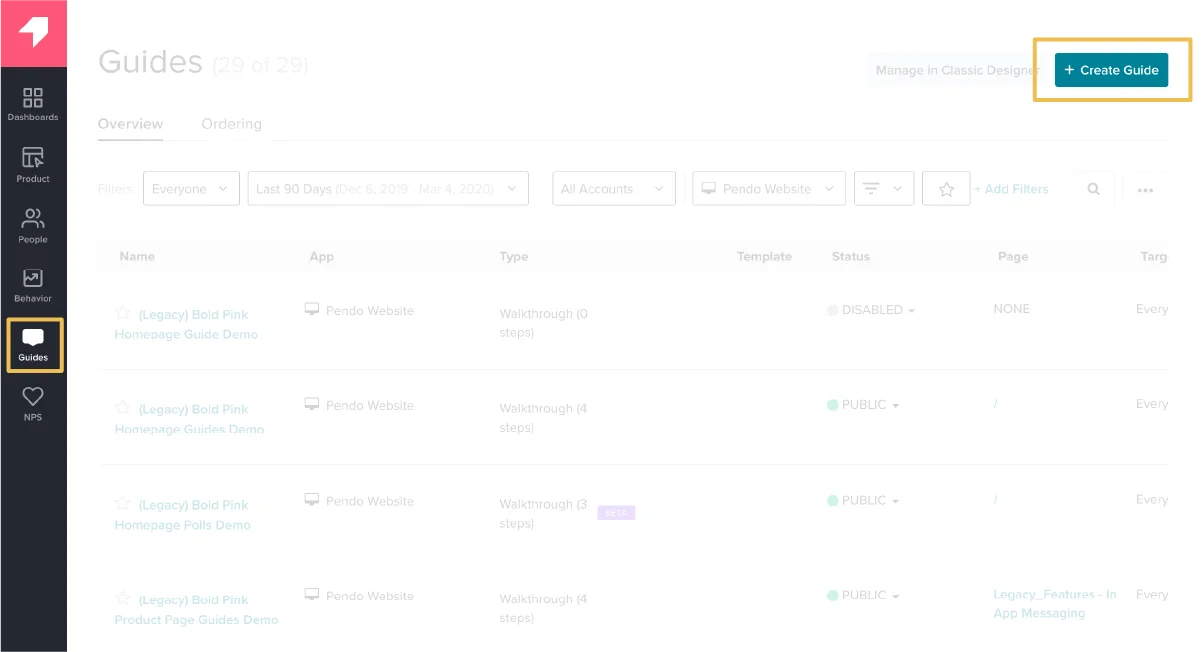
Pendoの[ガイドを作成(Create Guide)]ページに移動する
- ガイドは、アプリケーションの「ガイド(Guides)」タブから作成できます。
ステップ2:ガイドのレイアウト
ガイドのレイアウトを選択する
- Potential layouts include tooltips, lightboxes, banners, and multi-step guides, and your selection should be informed by what you’re trying to achieve with the guide.
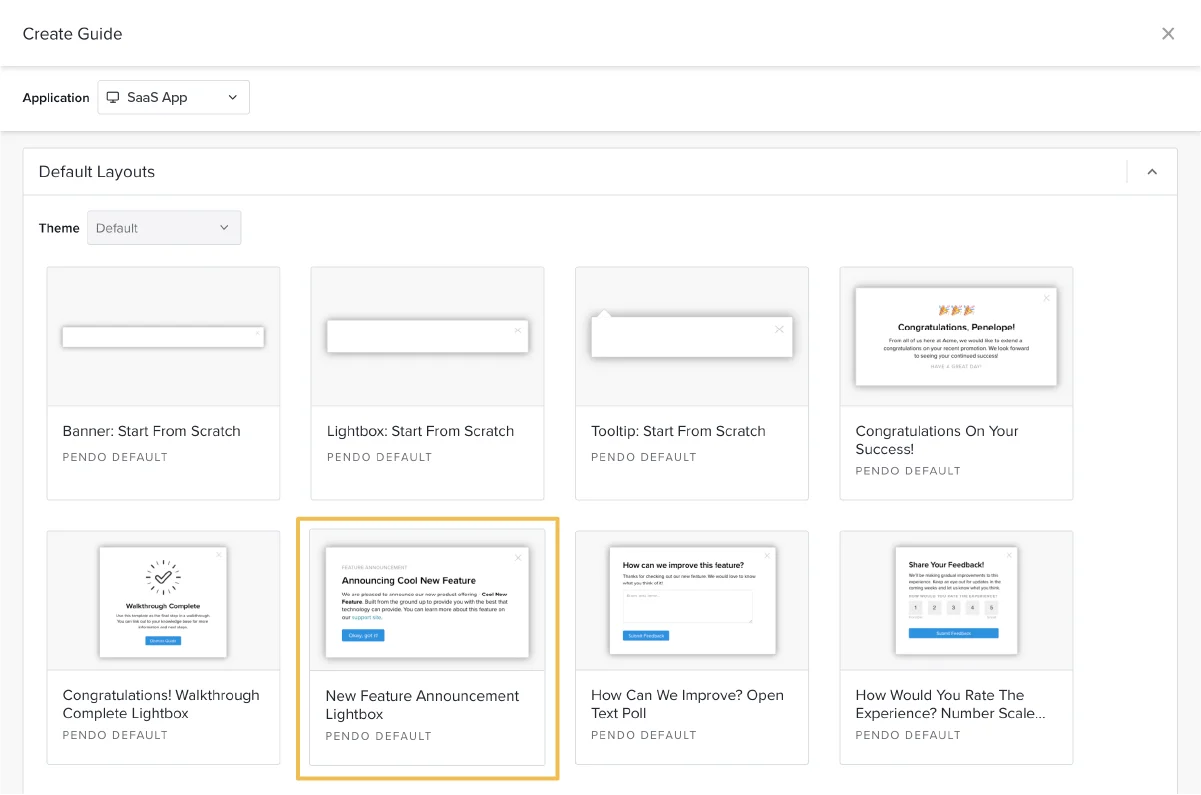
最高のオンボーディング体験は、複数のガイドで構成され、レイアウトが互いに効果的に組み合わされています。パッシブなツールチップと、アクティブなマルチステップのウォークスルーやライトボックスを組み合わせることで、ユーザーに最適な方法で情報を発見してもらうことができます。このような多面的アプローチにより、ユーザーが必要な情報を必要なときに必要な場所で得られるようになり、混乱やサポートチケットの減少につながります。
頻繁に使用するガイドタイプ用にレイアウトのテンプレートを作成することで、新しいガイドの作成を迅速に行えるようになります。
ステップ3:ガイドのコンテンツの構築
ガイドの各ステップのコンテンツと関連するアンカー要素を構築する
このステップでは作業の大半が行われます。このステップを完了する前に、オンボーディングウォークスルーでどの機能や要素を強調するかに関して、見通しを立てておく必要があります。初めて開始する場合は、ナビゲーションの概要を説明して、主要な機能がどこにあるかをユーザーに伝え、アプリケーションの各セクションの使用方法について理解してもらうのが良いでしょう。
At first, deciding which features to highlight will be primarily based on hypotheses and what you’ve come to learn about your users to this point. As you become more advanced, you can analyze feature usage and correlate customer outcomes to better understand which features will result in higher satisfaction and retention. One benefit of in-app onboarding with Pendo is that you can quickly iterate and test as you learn more about which guides are most successful.
中小企業向けCRMのInsightlyは、無料トライアルユーザー向けのオンボーディングを導入しました。Insightlyでは、アナリティクスを使って、どの機能が最もコンバージョンに相関しているかを詳細に把握しました。その知見に基づいてオンボーディングウォークスルーを調整したところ、トライアルのコンバージョンを3倍にできました。

ガイドの作成を開始するには、まずガイドの概要ページを確認します。
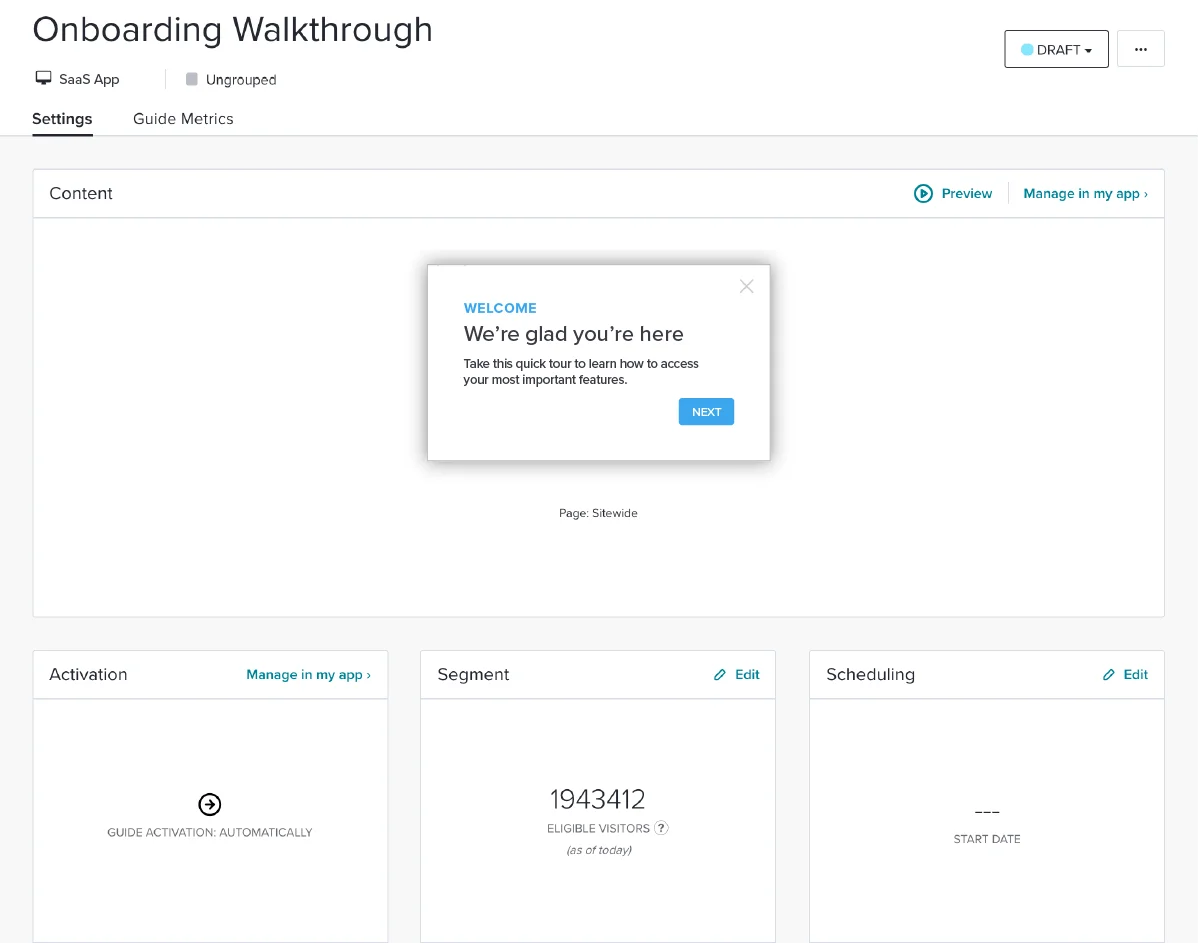
このページからガイドの一部分を編集することもできますが、最終版の全体像を確認できるアプリケーションでガイドを管理、編集するほうが簡単であることが多いです。
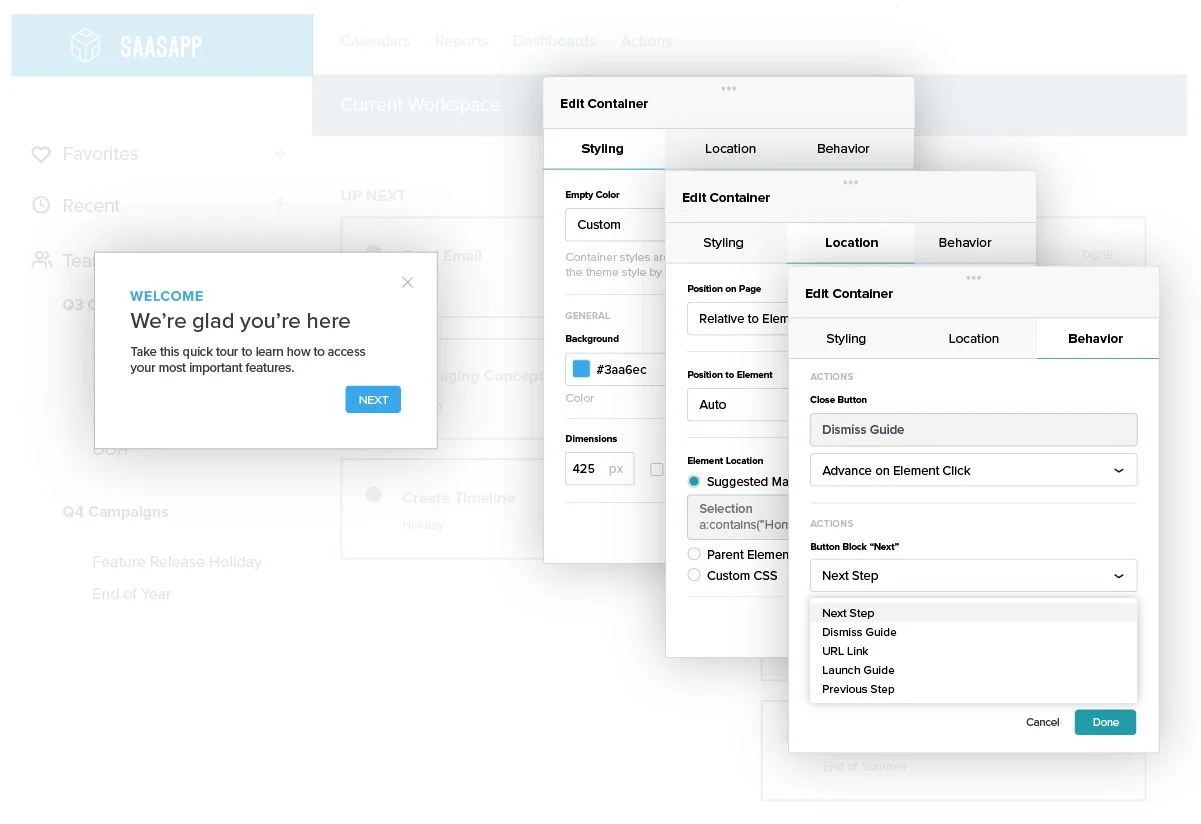
Once you’ve launched the Visual Design Studio in your application, you can easily tag the page element or feature you want to anchor your guide to and adjust the styling to be more consistent with your application. Within this page, you can also adjust text on the guide, add buttons, call to actions, or potentially insert an image or video. Finally, you can adjust what actions will occur once the buttons on the guide are clicked.
「一緒に~しましょう」や「私たち」などといった言葉を使用して、明確な指示を出して行動を促すことで、ユーザーとともにオンボーディングフローを進めるようにします。たとえば、「連絡先情報を一緒に入力しましょう。彼女の名前は山田さんです」などといった感じです。
ウォークスルーのステップごとに、ステップ2と3を繰り返します。
ステップ4:ガイドのアクティベーション
アクティベーション方法を選択する
ガイドのコンテンツが完成したら、ガイドのアクティベーション方法を選択します。
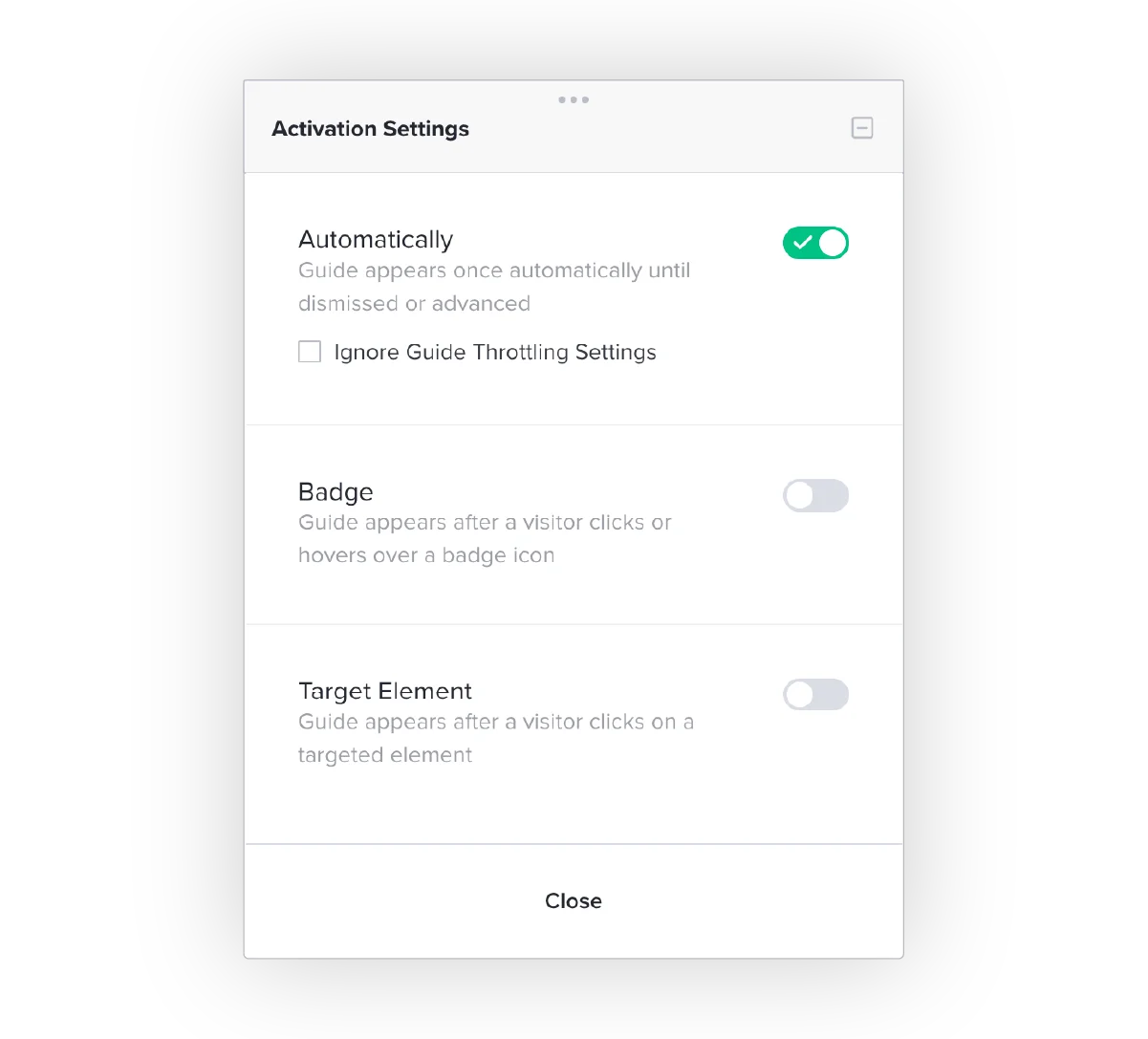
アクティベーションの方法は3つあります:
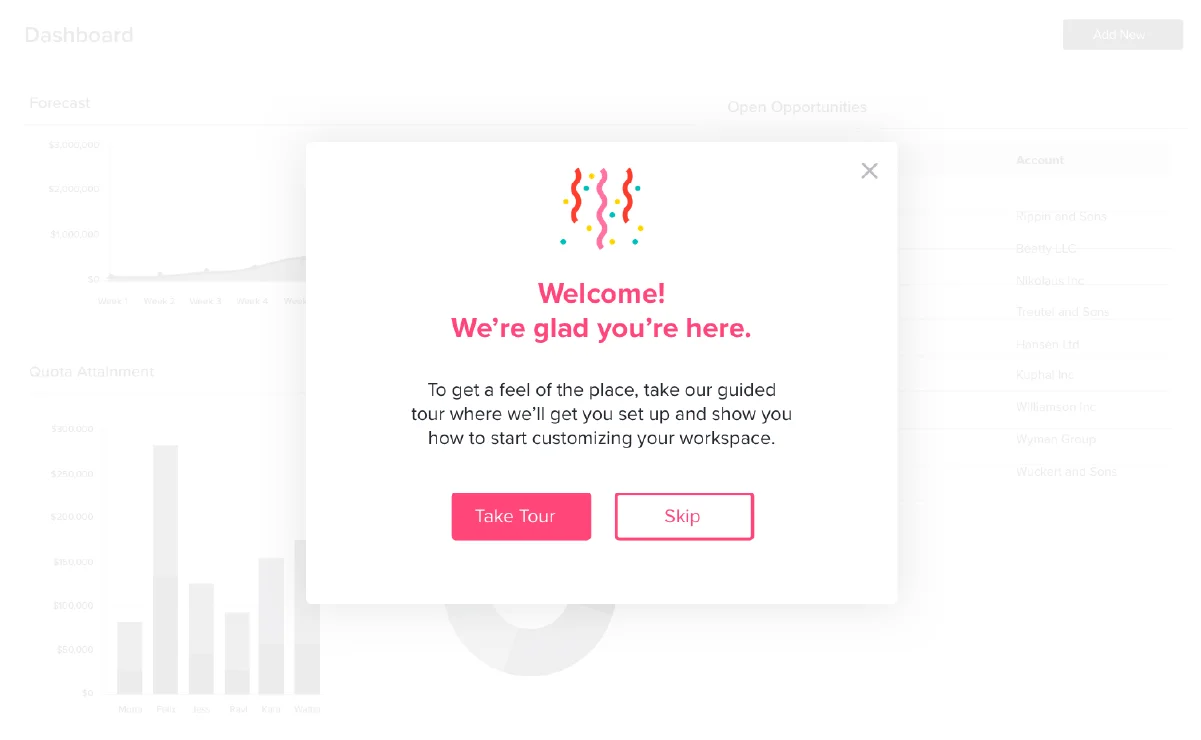
Automatically: These guides will appear automatically when a user arrives on the anchor page. This type of activation is best used for brand new users, so they have a welcome message immediately upon first login.
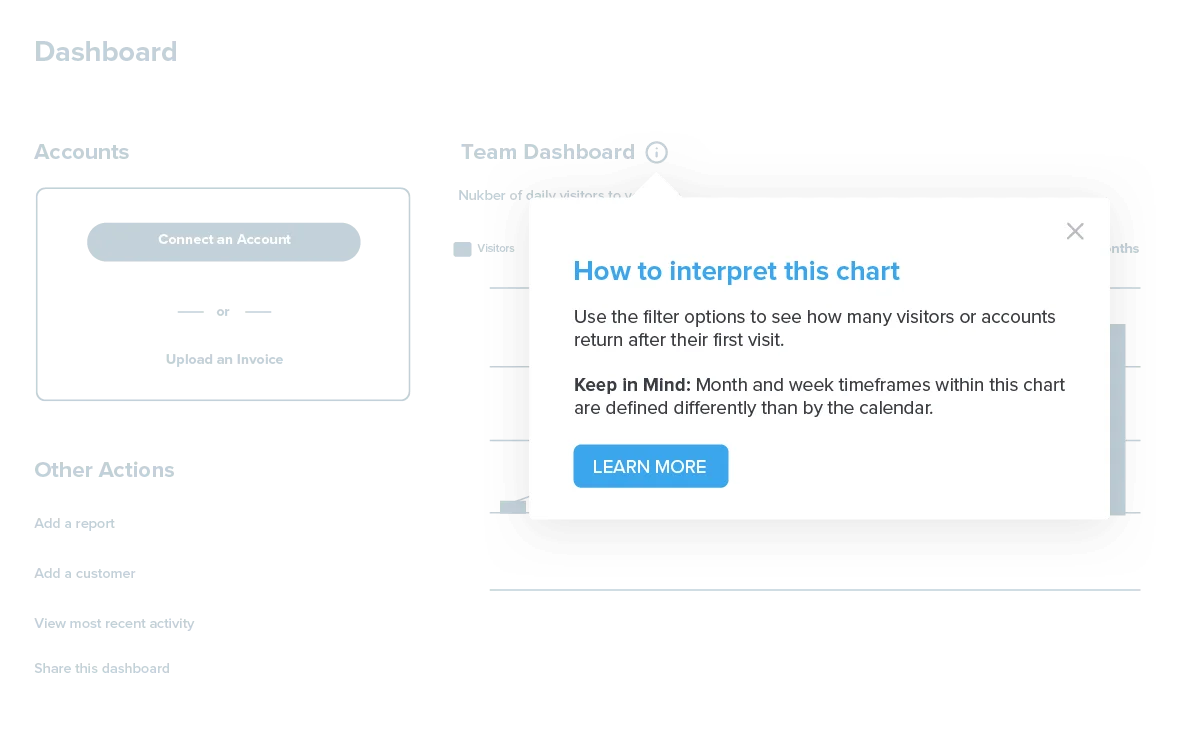
Badge: These guides appear after a visitor clicks or hovers over a badge icon. This activation method is best for passive tooltips that you want users to be able to access only if needed. Using badge activation can also help avoid cluttering the user interface.
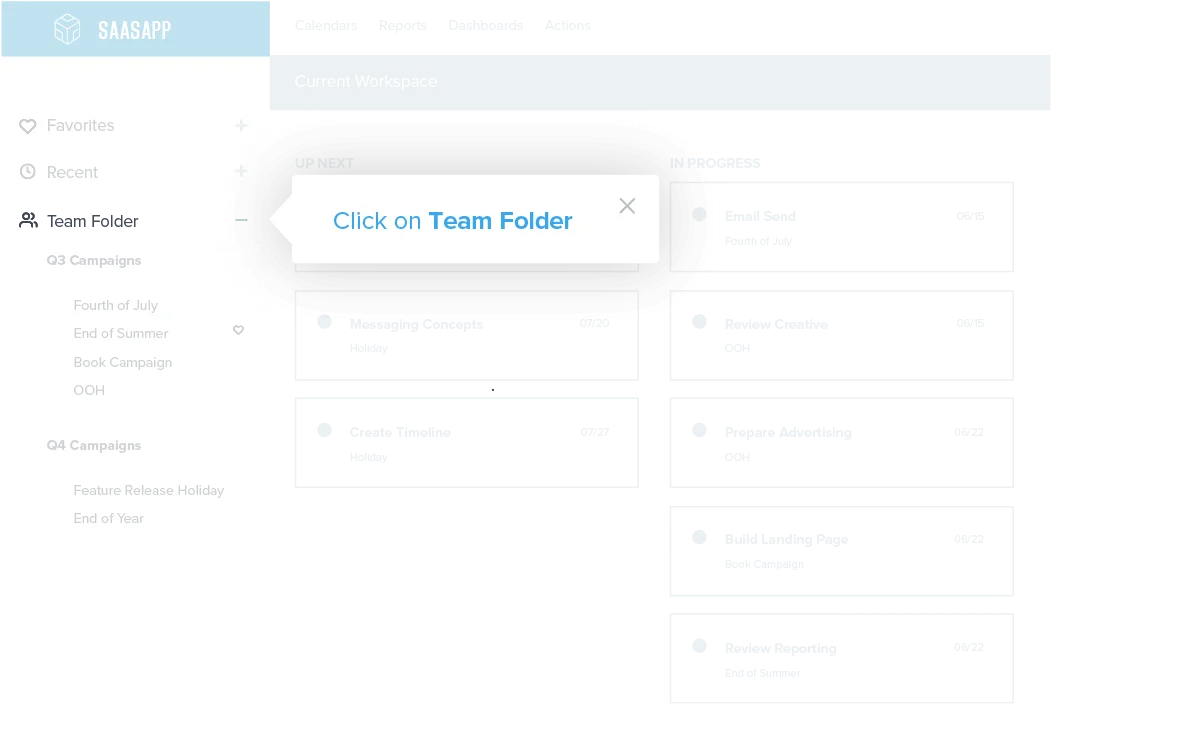
Target element: These guides will activate when a user clicks on the feature or page the guide is anchored to. These are best used when you want to train on a particular feature or page.
ステップ5:ガイドのセグメント化
ウォークスルーを展開する新しいユーザーセグメントを作成して選択する
Applying a segment to the guide will ensure that the walkthrough only reaches the users it’s relevant to: new users. As you get more experienced building onboarding flows and begin to understand the benefit of nuance, segmentation will be the secret weapon that allows your in-app training to become increasingly personalized to the user.
セグメントは、さまざまなメタデータやプロダクト使用状況データポイントを基に作成できますが、ここではまず、「訪問者の初回訪問(visitor first visit)」というメタデータフィールドを基に、新しいユーザーセグメントを作成します。
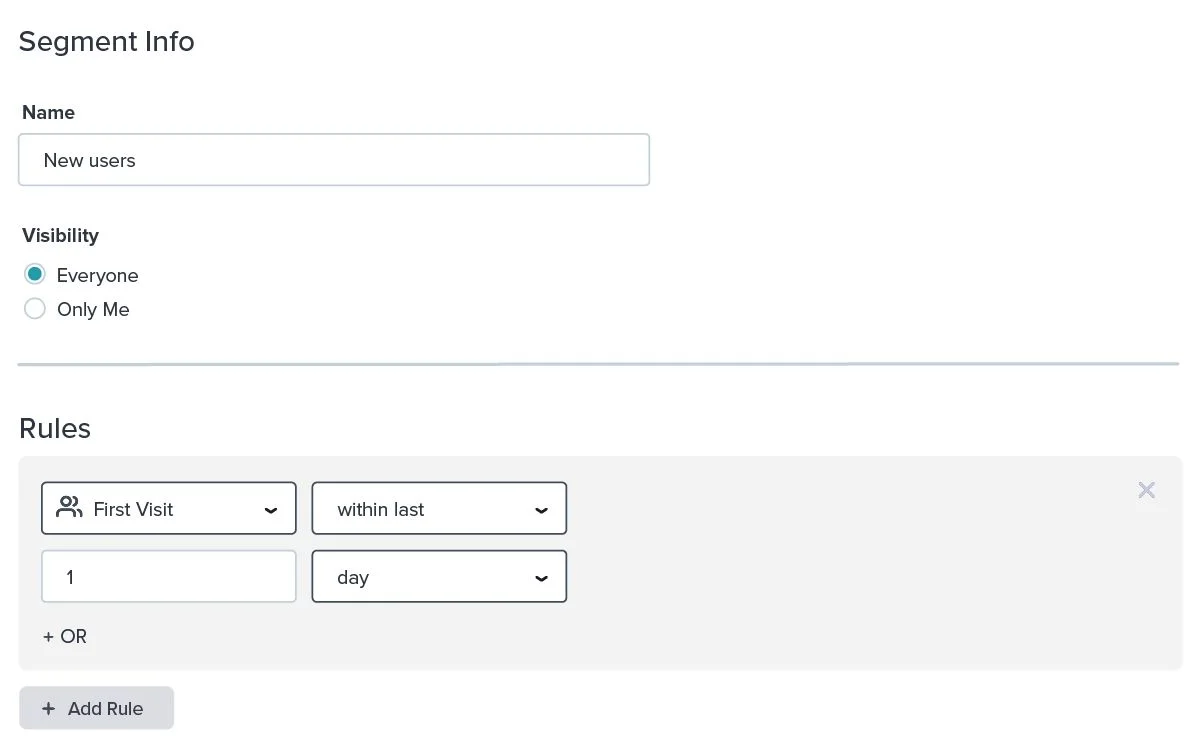
新入社員向けのプロダクトトレーニング向けに、社内ユーザーのセグメントを作成することができます。
ステップ6:ガイドの公開
ガイドをスケジュール設定して公開する
最後に、(初回のオンボーディングフローをユーザーのサブセットでテストする場合など)アプリケーションでガイドを実行する期間に制限がある場合は、ウォークスルーの開始日と終了日を設定します。
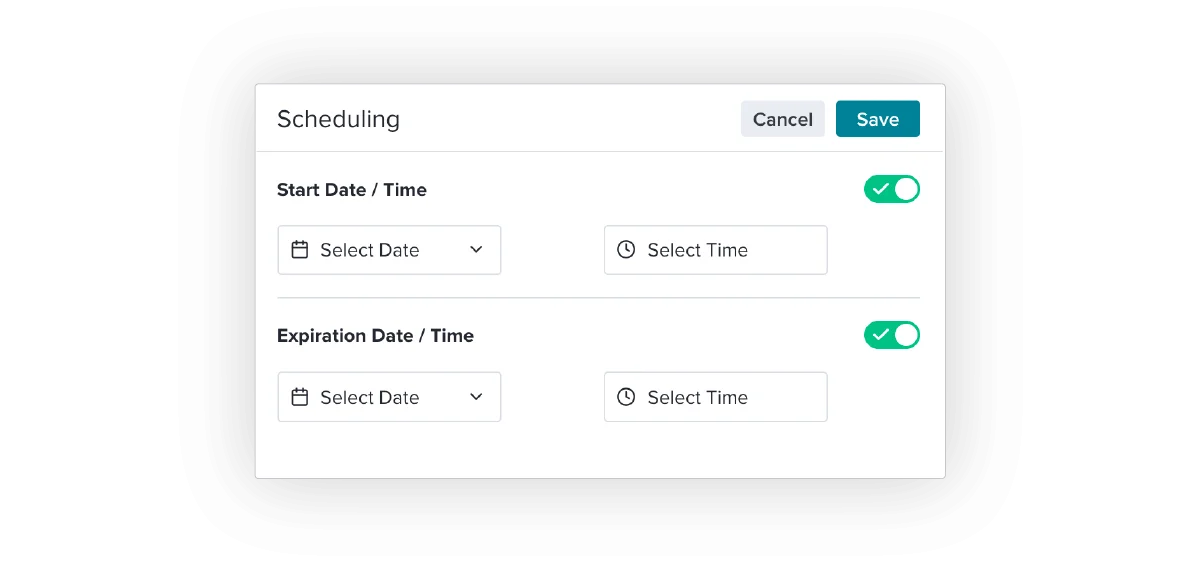
ここから、完成したガイドのプレビューを確認して、新しいユーザーに公開できます。
次のステップ
アプリ内オンボーディングフローの構築の基本をマスターすれば、アプリ内エンゲージメントでできることの選択肢は無限に広がります。Pendoの利用を進めて、より高度な行動トリガー、パーソナライゼーション、ナレッジベースのツールを使えるようになれば、適切なメッセージを適切なタイミングで配信できるようになります。エンジニアリングの必要はありません。
In part two, we’ll dig into using product data to optimize the onboarding experience.
